Contents
The ERP Buyer’s Guide for 2027: Research First, Speak to Sales When You’re Ready
Heading into 2027, it’s never been easier for to research. AI is now built into the platforms we use every day and is available on free plans, and it’s changing how search works, with Google as the clearest example.
At the end of October 2026, Alphabet’s shares fell more than 10% after its third-quarter results, wiping around $500 billion from its market value. Google had spent so heavily on AI data centres and chips that it went through around $9 billion more cash than it brought in, while Search revenue grew 12%, its slowest rate since 2023, partly because AI Mode, its chat-style search, earns less from ads than traditional results.
Google also said searches were growing at their fastest rate in five years. So the research is still happening, increasingly through AI answers, and that same shift is changing how businesses research and buy their next ERP.
Buyers can investigate platforms, compare approaches, estimate costs and test their own readiness before speaking to a vendor or implementation partner. Search, self-service tools, product documentation, peer reviews and AI-assisted research have moved much of the early buying process into the buyer’s hands.
That shift is bigger than a change in marketing. It changes how an organisation should approach one of its most important technology decisions. The goal is no longer to collect three polished demonstrations and choose the most convincing presenter. It's to build enough internal clarity to ask better questions, test claims and understand what successful implementation would demand from the business.
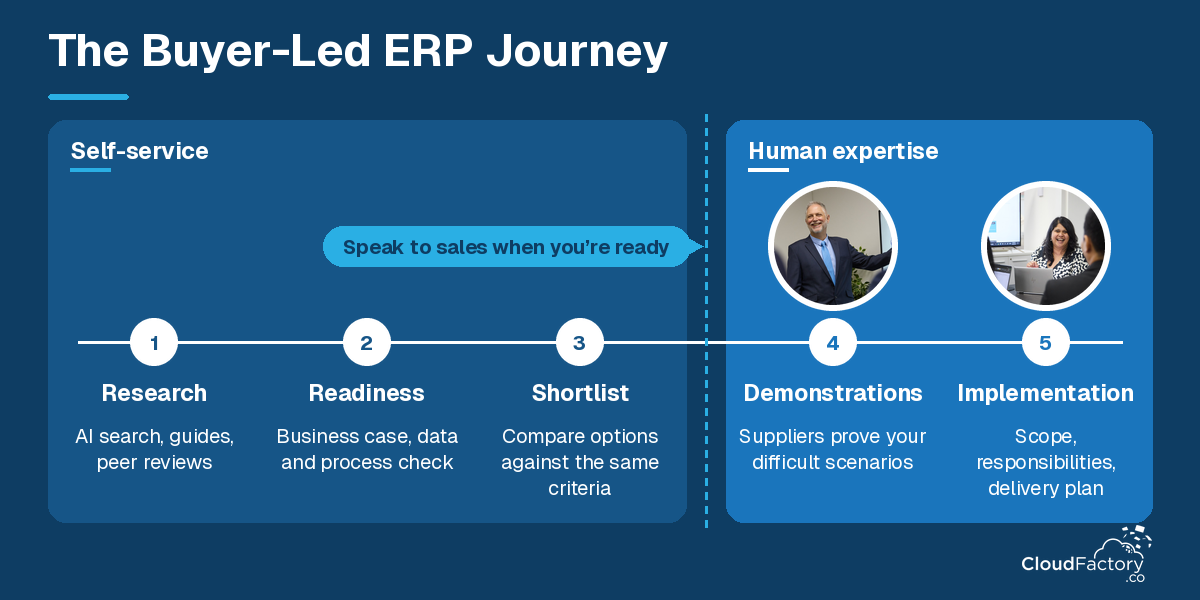
The strongest ERP buying process in 2027 will therefore be buyer-led, but not human-free. Digital research should help you define the problem and narrow the field. Experienced people should then help you challenge assumptions, expose delivery risks and turn a software choice into a workable implementation plan.
Why ERP Buying Has Changed
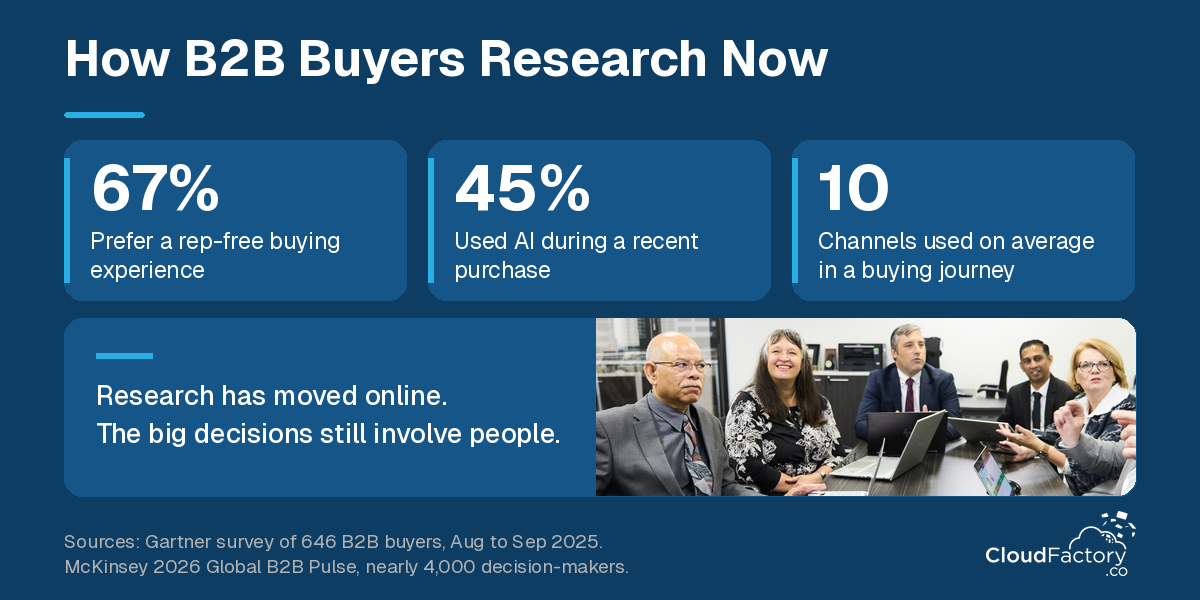
The move towards self-directed research is visible across business-to-business purchasing. A Gartner survey of 646 B2B buyers, conducted in August and September 2025, found that 67% preferred a rep-free experience. It also found that 45% had used AI during a recent purchase. These figures are not ERP-specific, but they show how quickly buyers are becoming more comfortable researching and evaluating complex purchases independently.
McKinsey's 2026 Global B2B Pulse Survey, based on nearly 4,000 decision-makers across 13 countries, found that buyers used an average of ten channels during the purchasing journey. Supplier websites, web search, video calls, in-person contact and generative AI all formed part of the process. Buyers increasingly expect consistent information as they move between those channels.
This does not mean salespeople and consultants have become irrelevant. The same research found different buyer preferences across its respondent base. Some buyers remained relationship-led, while others placed greater value on digital access, speed and self-service. Human interaction was more important when transactions were larger and less frequent.
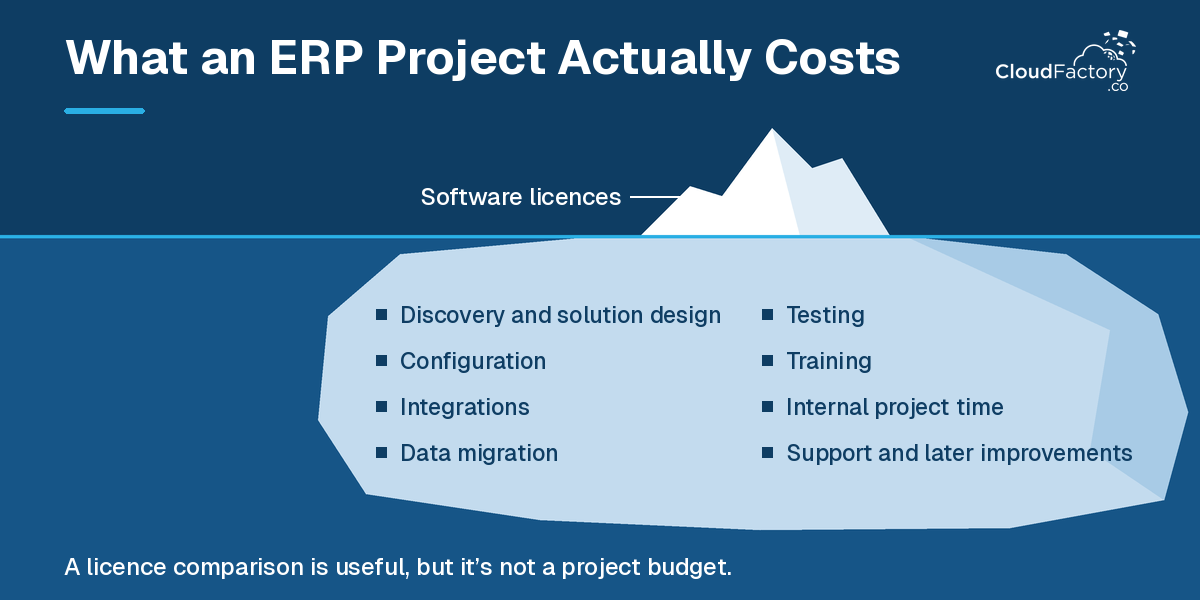
ERP sits firmly in that high-consideration category. Software licences may be only one part of the cost. Process design, integrations, data migration, training, change management and ongoing support can determine whether the system works in practice. Buyers still need expertise, but they want to decide when that expertise enters the process and what it should help them resolve.
What Is an ERP?
If you already know what an ERP is, you can jump ahead to the next section. If you've never come across ERP or business management systems, then here's what you need to know:
An ERP system (Enterprise Resource Planning) is software that brings the core parts of a business into one connected system. Finance, inventory, purchasing, sales, operations, reporting and other processes can work from the same underlying information. The software isn’t really the interesting part; the interesting part is the goal of a business that’s easier to run.
Imagine fewer spreadsheets holding processes together, less double handling between teams, and stock, orders, purchasing and financial information connected instead of sitting in separate systems. Management can get a clearer view of what’s happening without waiting for someone to build another report.
As the business grows, the system grows with it instead of creating more admin. That’s why businesses use these platforms; they want the business behind them to run better. ERPs won’t fix broken processes by themselves, but implemented around the right processes, they can create the foundation for a more connected, visible and scalable business.
Start With the Business Case, Not the Product List
An ERP search can go wrong before a demonstration is booked. If the project starts with product names, the evaluation is likely to become a contest between features. That makes it easy to overlook the operating problems the investment is meant to solve.
Start by writing down the pressures behind the project. These might include delayed reporting, duplicate data, manual stock updates, slow month-end processes, limited multi-entity visibility or too much work passing between disconnected systems. Record the current effect, the desired outcome and how success will be measured.
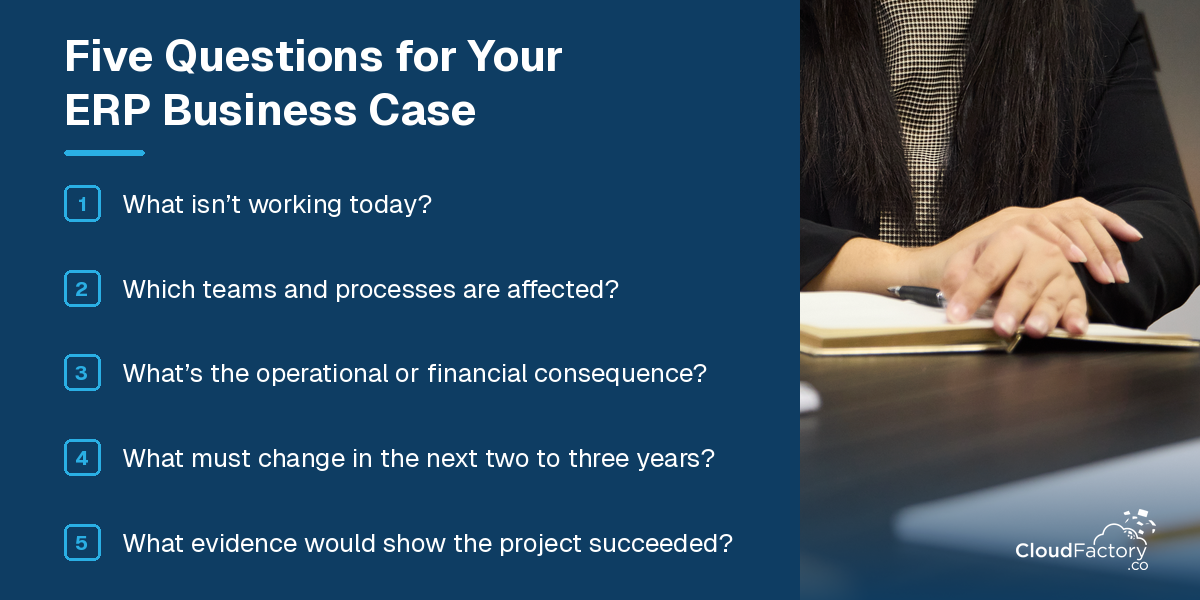
A useful business case should answer five questions:
- What is not working today?
- Which teams and processes are affected?
- What is the operational or financial consequence?
- What must change within the next two to three years?
- What evidence would show that the ERP project succeeded?
This gives the buying team a stable reference point. A feature matters only when it supports an agreed outcome or removes a real constraint.
Check Whether the Organisation Is Ready
ERP is a business change programme supported by software. Before evaluating platforms, assess whether the organisation has the time, ownership and decision structure to run the project.
Name an executive sponsor and a day-to-day project owner. Bring finance, operations, IT and the people who perform the affected work into the process early. Decide who can approve scope, resolve disagreements and accept process changes. If every decision has to travel through an informal chain of emails, that weakness will follow the project into implementation.
Readiness also includes the condition of the data. Identify duplicate customer and supplier records, inconsistent product codes, inactive inventory, unclear ownership and information held outside core systems. An ERP can provide a stronger operating structure, but it cannot make poor data reliable by itself.
The same applies to processes. Document how important work is completed today, including exceptions and manual workarounds. Then separate what must be preserved from what exists only because of the current system. Replicating every old workaround in a new platform can create an expensive version of the same problem.
Build Outcome-Based Requirements
Long requirement lists often create false confidence. They can contain hundreds of items while failing to show which capabilities are critical, which are negotiable and why they matter.
Write requirements around outcomes and scenarios instead. For example, “support inventory” is vague. “Provide available-to-promise stock across two warehouses, including committed sales orders and inbound purchase orders” gives a supplier something specific to demonstrate.
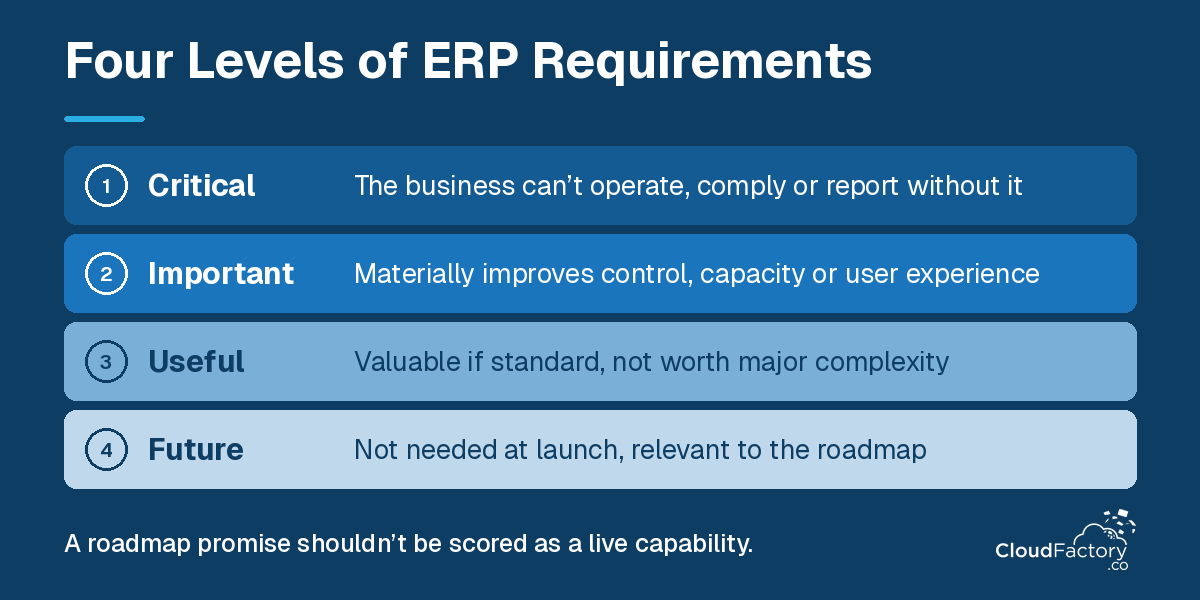
Group requirements into four levels:
- Critical: the business cannot operate, comply or report without it
- Important: it materially improves control, capacity or user experience
- Useful: valuable if standard, but not worth major complexity
- Future: not needed at launch, but relevant to the platform roadmap
Include data, reporting, security, integrations and user roles alongside functional requirements. If AI capability is part of the case, ask where the feature is available now, what data it uses, how outputs are checked and whether it changes licensing, security or implementation work. A roadmap promise should not be scored as a live capability.
Set a Realistic Budget and Compare Total Cost
A licence comparison is useful, but it's not a project budget. The cost of ERP can include discovery, solution design, configuration, custom development, integrations, data migration, testing, training, internal project time, support and later improvements.
Ask each shortlisted provider to separate recurring software costs from implementation and ongoing services. Make assumptions visible: user types, legal entities, locations, functional areas, data volumes, interfaces and support coverage. If two estimates use different assumptions, their totals are not comparable.
Also test the cost of complexity. A lower-priced platform can become expensive if it requires extensive customisation. A broader platform can be of poor value if much of its capability will never be used. The right commercial question is not “Which ERP is cheapest?” It's “Which approach can meet the required outcomes with acceptable delivery risk and a sustainable cost over time?”
Create a Shortlist Before Booking Demonstrations
By this point, the organisation should know its critical requirements, operating constraints, approximate budget and preferred implementation window. Use those facts to reduce the market to a sensible shortlist.
Assess each option against the same areas:
- Support for the required financial and operational processes
- Relevant industry capability
- Reporting and analytics
- Integration options
- Security, access control and auditability
- Local product, implementation and support coverage
- Scalability across users, entities and locations
- Product direction and release model
- Expected implementation effort and ongoing cost
Avoid scoring platforms only from website claims. Use product documentation and structured supplier responses, then validate the important points in demonstrations and discovery.
Make Demonstrations Prove the Difficult Work
Generic demonstrations are built to look smooth. Your evaluation should focus on the work that is difficult, high-volume or risky in your organisation.
Give each supplier the same scenarios in advance. Ask them to show a complete process using realistic roles and data, not a collection of screens. Include an exception, such as a partial delivery, credit hold, changed production order or cross-entity transaction. Ask what is standard, what needs configuration, what requires an add-on and what would need custom work.
Record answers and outstanding assumptions during the session. Score the demonstration against the agreed requirements after it ends, before presentation quality becomes the main thing people remember.
The implementation partner should be evaluated as carefully as the product. Ask who will lead discovery and delivery, how scope changes are managed, what the data migration approach includes, how testing is organised and what support is available after go-live. Request references that are relevant to the proposed platform, industry and project complexity, subject to customer permission.
Treat Implementation as Part of the Buying Decision
The software decision and the delivery decision cannot be separated. Before signing, the buying team should understand the proposed scope, delivery stages, responsibilities, assumptions, exclusions, timeline, acceptance process and change-control method.
Clarify what the organisation must provide. That may include clean data, subject-matter experts, timely decisions, test scripts, user acceptance testing and training attendance. A plan that assumes unlimited access to key staff during a busy period is not a workable plan.
Review the contract and statement of work against the same outcomes used in the business case. Confirm how integrations, historical data, reports, customisations and support are handled. Identify which costs are fixed, estimated or dependent on discovery. If important assumptions remain unresolved, make them visible rather than allowing them to sit inside a broad project description.
How We Are Supporting a Buyer-Led Process
We think buyers should be able to learn, compare and estimate before they are asked to enter a sales process. Our role is to make that research more useful, then provide human guidance when the questions become specific to the organisation.
Our online ERP Readiness Assessment helps organisations record where pressure sits across their current systems and identify areas to address first. Our ERP Guides, Comparisons & Insights library includes ERP selection guidance, platform information, evaluation checklists, comparisons and practical Business Central videos. These materials are intended to help a buying team build its knowledge without beginning with a meeting.
We are also adding greater cost transparency for licensing and implementation. Our Business Central Licence Pricing Calculator shows Microsoft Australia list pricing based on the selections made, without requiring contact details for the licence calculation. We then did the same for MYOB Acumatica Licensing Pricing. Both calculators separate those figures from indicative implementation ranges and explains that actual scope, effort and cost are confirmed through discovery and solution design.
When a buyer is ready for direct input, our ERP Advisory, Implementation & Optimisation Services cover readiness, requirements, platform evaluation, budgeting and project planning. We work with SAP Business One, MYOB Acumatica and Microsoft Dynamics 365 Business Central, then support solution design, implementation, data migration, integrations, training and ongoing improvement where required.
That combination matters. Self-service information gives buyers control and allows internal teams to prepare. A structured conversation can then focus on the organisation’s real constraints instead of repeating information that could have been published online.
The Better Buying Process for 2027
A good ERP decision means every interaction has a clear purpose.
Use independent research and self-service tools to understand the market, define the problem and expose internal gaps. Use suppliers and advisers to test what cannot be answered reliably from general information: process detail, data risk, integration effort, delivery responsibility and commercial scope.
By the time sales enters the conversation, the buyer should already know what must change, which outcomes matter and where uncertainty remains. That produces a better discussion for both sides and a stronger foundation for the project that follows.
For a practical starting point, use our ERP Readiness Assessment to identify where your current systems are creating pressure and which questions to investigate next.