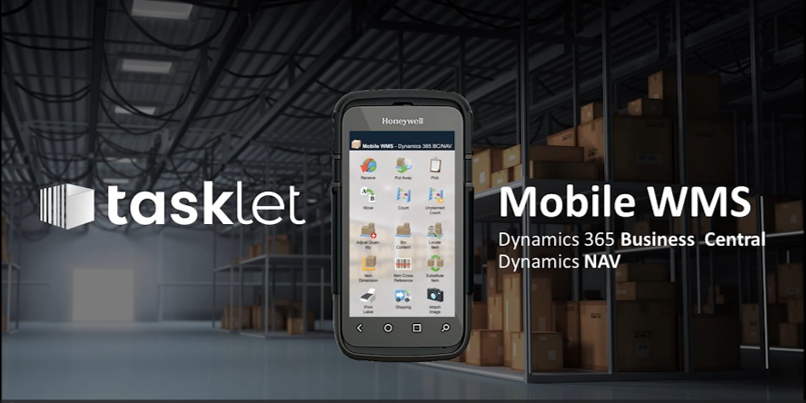
Enable Real-Time Warehouse Execution with Tasklet Mobile WMS
Improve picking accuracy, streamline warehouse workflows and extend Microsoft Dynamics 365 Business Central with a mobile-first warehouse management solution.
Why Mobile Warehouse Execution Matters
Many warehouses still rely on paper-based picking, manual data entry or delayed updates into Business Central. This creates inaccuracies, delays and inefficiencies across warehouse operations.
- Reduce picking errors with barcode scanning
- Eliminate paper-based warehouse processes
- Enable real-time inventory updates
- Improve warehouse productivity and throughput
- Support scalable warehouse operations
Core Warehouse Capabilities with Tasklet Mobile WMS
Tasklet Mobile WMS extends Microsoft Dynamics 365 Business Central with mobile barcode scanning and real-time warehouse execution. It helps warehouse teams improve accuracy, reduce manual handling and complete key warehouse tasks directly from mobile devices.
Mobile Barcode Scanning
Enable warehouse staff to scan items, bins and documents in real time, reducing manual entry and improving transaction accuracy across inbound, internal and outbound processes.
Directed Picking and Put-away
Support more accurate warehouse execution with guided picking, bin movements and put-away processes aligned to warehouse locations and inventory rules in Business Central.
Receiving and Inventory Movements
Streamline goods receipt, stock transfers and warehouse movements with mobile workflows that update Business Central in real time and improve visibility across inventory transactions.
Inventory Counts and Cycle Counting
Improve stock accuracy with faster warehouse counts, cycle counts and inventory verification using mobile devices and barcode scanning instead of paper-based processes.
Real-Time Integration with Business Central
Tasklet works directly with Microsoft Dynamics 365 Business Central, allowing warehouse transactions to flow through to inventory, warehouse documents and operational records without duplicate entry.
Improved Warehouse Productivity
By reducing paper, manual handling and rework, Tasklet Mobile WMS helps distribution businesses improve warehouse efficiency, increase throughput and support more consistent operational performance.
Core Warehouse Capabilities with Tasklet Mobile WMS
Tasklet Mobile WMS extends Microsoft Dynamics 365 Business Central with mobile barcode scanning and real-time warehouse execution. It enables warehouse teams to improve accuracy, reduce manual processes and operate more efficiently.
- Mobile barcode scanning across all warehouse operations
- Directed picking, put-away and bin movements
- Goods receiving and inventory transfers
- Cycle counting and stock verification
- Real-time updates directly within Business Central
- Reduction in paper-based processes and manual entry
When Tasklet Mobile WMS is the Right Fit
- You are using Microsoft Dynamics 365 Business Central
- You need to improve warehouse accuracy and efficiency quickly
- Your warehouse processes rely on manual or paper-based workflows
- You want to introduce barcode scanning and mobility
- You do not require a full standalone WMS platform
Key Capabilities of Tasklet Mobile WMS
Offline Warehouse Capability
Maintain warehouse operations even in low or no connectivity environments. Tasklet Mobile WMS securely stores transactions and synchronises with Business Central once connectivity is restored, ensuring uninterrupted workflow performance.
Mobile Barcode Scanning
Enable warehouse staff to complete picking, receiving and stock movements using real-time barcode scanning, reducing manual entry and improving operational accuracy.
Directed Picking and Put-away
Guide warehouse users through optimised picking, bin movements and put-away processes aligned with warehouse locations and inventory rules in Business Central.
Seamless Business Central Integration
Tasklet works directly with Microsoft Dynamics 365 Business Central, ensuring warehouse transactions update inventory, orders and operations in real time without duplication.
Inventory Counts and Cycle Counting
Improve stock accuracy through faster and more reliable inventory counts, cycle counting and stock verification using mobile devices instead of paper-based processes.
Configurable Warehouse Workflows
Adapt Tasklet to your warehouse processes, including receiving, transfers and inventory control, ensuring alignment with your operational requirements.
Gaining Efficiencies Within The Warehouse
In this checklist, we'll not only walk you through how to achieve it but also the remarkable benefits you'll reap. Explore:
- Proven techniques for optimising warehouse organization and workflow.
- Strategic approaches for faster item picking and packing.
- The art of establishing rock-solid order validation processes.
- Staying on the cutting edge with real-time data to maintain top-notch performance.
- Streamlining your workflows for maximum efficiency.
- Embracing the advantages of adopting mobile solutions.
Picking
Designed to move paper-based picking processes into the wireless world. This core module supports multiple styles of RF picking, picking stations, split pack-sizes, batch-pick and repack, shipment labels, and warehouse packing slips. Pick bins are replenished using Hot Replenishment, which is the process of requesting that inventory be replenished to pick bins to meet current sales order requirements.
Receiving
Designed to move paper-based receiving processes into the wireless world. This core module supports paperless check-in, product and carton labelling. It also supports non-PO receiving, for warehouses that allow receipt of products into the warehouse that do not appear on a purchase order.
Replenishment
This module supports Advanced Replenishment, which is the process of requesting that inventory be replenished from overstock bins to pick bins before products are actually required to fill sales orders.
Warehouses are configured to use one of two types of advance replenishment: min/max, or days on hand. Min/max replenishment is based on a predefined minimum quantity of product that must be in pick bins.
Days on hand replenishment is based on a defined minimum number of days that the product must be available in pick bins. When a dispatcher runs the Advanced Replenishment function in Web Dispatch, the system issues replenishment requests for bins that are found to be below this minimum.
Multi-Zone
A zone is an area within a physical location where inventory is stored or different activities are performed. A zone serves to organize stock and warehouse staff workloads. The Multi-Zone module allows you to define up to 26 zones. This module enables zone picking, pick and pass picking, multi-zone simultaneous and sequential picking, and replenishment by zone.
Cloud Dispatch
This is the cloud-based user interface for HighJump. This core module provides reporting capabilities to monitor daily warehouse operations in real-time, and to generate historical reports. Views also display sales, work and purchase orders in the warehouse.
Book a Complimentary ERP Assessment
Book a complimentary ERP assessment with Cloud Factory to review your current systems, identify operational gaps and determine the right solution to support your business growth.