
SAP Business One – KPI & Analytics Tune-Up
SAP Business One User Group Event 2026
Optimise dashboards, KPIs and reporting using Crystal Reports, Boyum Dashboards, SQL Queries and SAP Business One Web Client Analytics, while preparing for the Version 11 web client experience.
Date: August 2026
Refresh dashboards and KPIs for the V11 web-client experience.
The 2026 User Group Training Series – “Getting Ready for Version 11” is designed to help SAP Business One customers prepare step by step, with focused, practical sessions spread across the year.
Each 1-hour session will dive into a key area of configuration or process design, so you can realise immediate improvements today while laying the groundwork for a smoother Version 11 upgrade.
As SAP Business One moves toward Version 11, analytics, dashboards, and real-time visibility become even more important — especially with the expanded capabilities of the Web Client and the Service Layer.
This session will help you transform your cockpit, dashboards, and KPIs into a cleaner, more insightful, Version-11-ready analytics environment.
In this session you'll see:
- Crystal Reports – Build and customise operational and management reports.
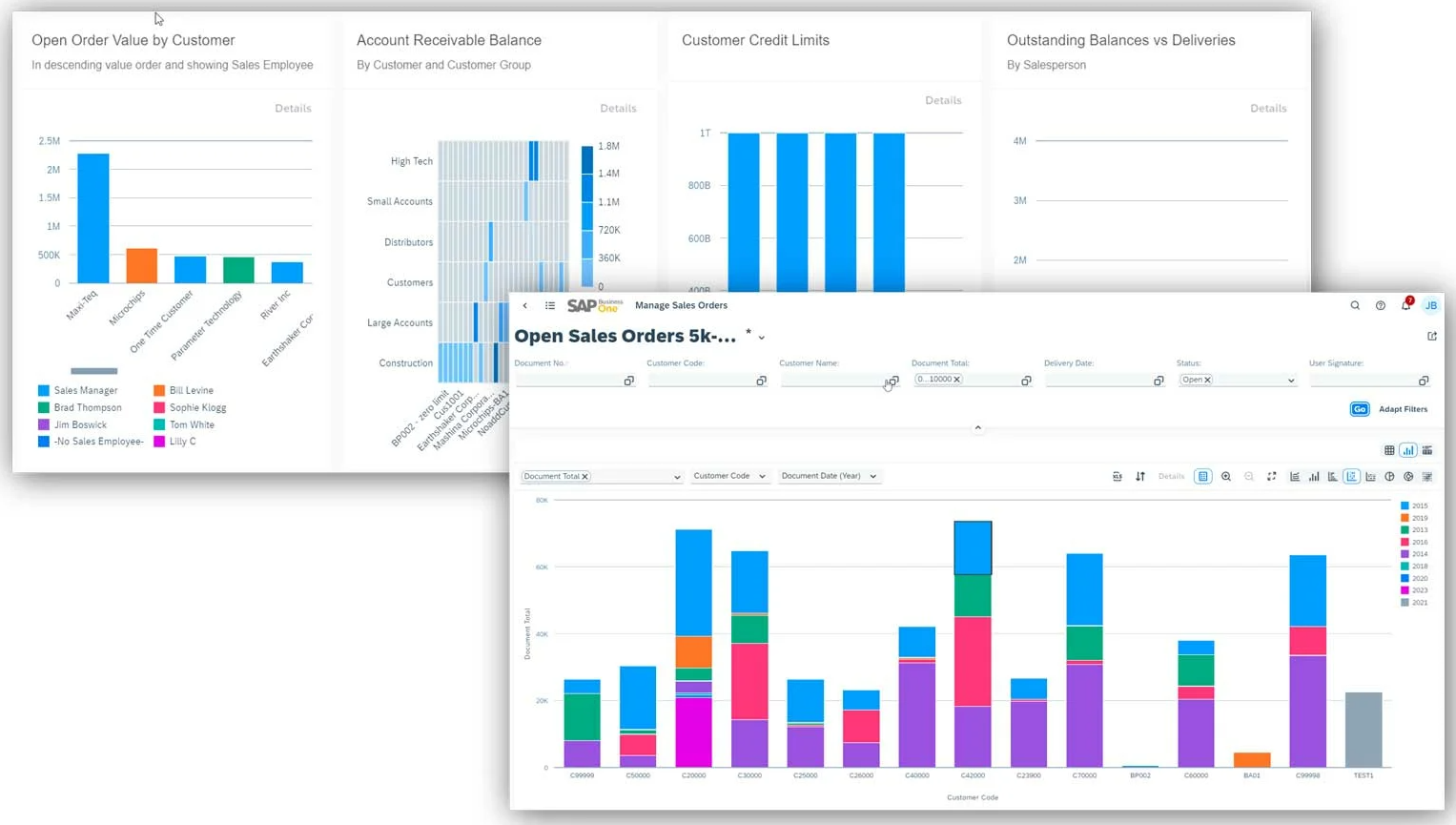
- Boyum Dashboards – Create interactive dashboards that bring your KPIs to life.
- SQL Queries – Learn how powerful queries can answer everyday business questions and support reporting.
- SAP Business One Web Client Analytics – Explore the latest browser-based analytics and dashboards available in the Web Client.
You'll also learn:
- Which reporting tool is best suited to different business requirements.
- How these tools complement each other.
- How they fit into your Version 11 readiness strategy.
If your team wants better visibility, faster decision-making, and a clearer path to the new analytics experience in Version 11, this session delivers the practical steps you need.
We look forward to seeing you at the session.
Agenda
KPI Best Practices for Smarter Decision-Making
Understand what makes a KPI meaningful, how to avoid misleading metrics, and how to align KPIs to finance, sales, inventory, and operational goals. Learn the principles behind building KPIs that drive action rather than noise.
-
What makes a KPI meaningful
-
How to avoid “bad KPIs” that mislead users
-
Aligning KPIs to departmental goals (Finance, Sales, Operations, Inventory)
Cockpit & Dashboard Optimisation
Review how to streamline the SAP Business One Cockpit, restructure dashboards, and remove clutter. Learn how to create consistent, role-based dashboard layouts that improve clarity, speed, and user engagement.
-
How to streamline Cockpit layouts to remove clutter
-
Customising Dashboards for speed, clarity and relevance
-
Harmonising dashboards across teams
Reporting & Analytics Toolkit
Compare the reporting options available in SAP Business One and understand where each fits within your business.
- Crystal Reports
- Boyum Dashboards
- SQL Queries
- Web Client Analytics
Data Structure & Performance Considerations
Learn how clean master data, UDF structure, and query performance influence the accuracy and speed of your dashboards. Understand how to tune data sources so KPIs and analytics load faster and reflect true business activity.
-
Ensuring clean, reliable source data
-
Understanding how master data impacts KPI accuracy
-
Optimising queries to improve dashboard performance
When is the event?
Who Should attend?
Finance Managers, Inventory Controllers, Sales Leaders, Operations Managers, Power Users, and anyone who relies on dashboards or KPIs to run the business.
This session will help your team build an analytics environment that is accurate, insightful and ready for the future of SAP Business One.
Will I be able to ask questions?
The online event is set in a webinar format. To avoid distractions and confusions during the event, all attendees will be on mute. However, you will be able to virtually put your hand up for questions or post the questions in the 'Questions' section and we will answer them at the end of the event!
Will I get a recording?
If you are unable to attend live, still register as we’ll send you the recording.
Request Recording
Complete the form below to access the webinar recording.