Contents
Does SAP Business One Still Need an Add-On to Email Documents?

Document emailing and delivery in SAP Business One has changed considerably over the years. In earlier versions of SAP Business One, businesses wanting to automatically email invoices, orders, statements and other documents commonly relied on third-party solutions such as Streamline AutoDocs.
As the SAP Business One ecosystem evolved, solutions such as Boyum B1 Print & Delivery provided increasingly sophisticated document automation, including automated emailing, printing, document routing and conditional delivery.
SAP Business One itself, however, has also continued to evolve.
Today, standard SAP Business One functionality can satisfy many of the document-emailing requirements for which an add-on would historically have been considered essential. For businesses with relatively straightforward requirements, this raises an important question: do you still need a third-party document delivery solution at all?
Increasingly, the answer is not necessarily.
What can SAP Business One email as standard?
SAP Business One provides native email functionality through its standard email capabilities, including SBO Mailer, allowing documents generated from SAP Business One to be distributed electronically without necessarily requiring an additional document-delivery application.
The range of supported SAP Business One documents is extensive and includes many of the documents businesses communicate with customers and suppliers every day.
Sales Documents
- Sales Quotations
- Sales Orders
- Deliveries
- Return Requests and Returns
- A/R Down Payments
- A/R Invoices
- A/R Credit Memos
- A/R Monthly Invoices
Purchasing Documents
- Purchase Requests
- Purchase Quotations
- Purchase Orders
- Goods Receipt POs
- Goods Return Requests and Goods Returns
- A/P Down Payments
- A/P Invoices
- A/P Credit Memos
- A/P Monthly Invoices
- Landed Costs
Banking, Inventory, Production and Service Documents
Standard functionality extends beyond sales and purchasing documents. Supported documents also include incoming and outgoing payments, deposits, journal entries, goods receipts and issues, inventory transfers, production orders, pick lists, inventory counting and posting documents, service calls, service contracts and equipment cards.
This means that native SAP Business One document emailing is no longer limited to a small number of basic sales documents. It can support a substantial proportion of the documents generated during normal SAP Business One processing.
PDF Generation and Document Emailing
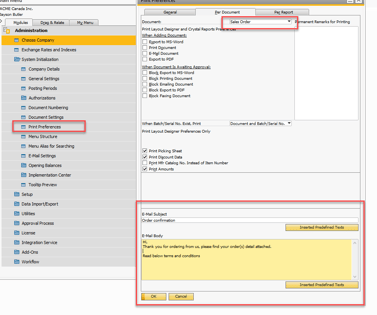
SAP Business One can generate document output in PDF format and use the resulting document as an email attachment.
For a common requirement such as emailing a PDF copy of an A/R Invoice to a customer, standard SAP Business One may therefore provide everything that is required.
The same principle can apply to quotations, sales orders, deliveries, credit memos, purchase orders and many other SAP Business One documents.
For organisations whose requirement is essentially:
"When we create this document, send the appropriate SAP Business One document to the customer or supplier by email."
the first question should now be whether this can be achieved using standard SAP Business One functionality before introducing another application.
Where has standard SAP Business One become stronger?
The distinction between standard SAP Business One and specialist document-delivery solutions has narrowed considerably for everyday document emailing.
Depending on the document, configuration and business process, standard SAP Business One provides capabilities including:
- Emailing SAP Business One documents.
- Generating PDF document output.
- Using Business Partner and contact information for recipients.
- Standard To, CC and BCC recipient handling.
- Configurable email subject and body content.
- Email attachments.
- Support for SAP Business One document layouts and Crystal Reports.
- Batch-related document and email processing.
- Native integration without an additional third-party application or service layer.
For many businesses, these capabilities may be sufficient to meet their day-to-day customer and supplier document communication requirements.
Does this mean solutions such as Boyum B1 Print & Delivery are no longer required?
No. There remains an important distinction between document emailing and more sophisticated document delivery automation.
Solutions such as Boyum B1 Print & Delivery are specifically designed as document output and delivery automation platforms. They can provide considerably more sophisticated control over what happens to a document, which layout is selected, who receives it, where it is printed or saved and the conditions under which those actions occur.
A specialist solution may therefore still be appropriate where requirements include:
- Complex conditional email or print rules.
- Different document layouts automatically selected according to customer, document or business conditions.
- SQL-driven document delivery rules.
- Advanced dynamic recipient selection.
- Scheduled or recurring document distribution.
- Complex batch and bulk document processing.
- Conditional inclusion of multiple attachments.
- Automated printer selection and routing.
- Different printers selected according to business conditions.
- Combined email, print, save and archive workflows.
- More sophisticated document-delivery logging and failed-delivery monitoring.
These are requirements for a document automation platform rather than simply a requirement to email an SAP Business One document.
From AutoDocs to Print & Delivery to Standard SAP Business One
For long-term SAP Business One customers, the evolution is significant.
Historically, products such as Streamline AutoDocs addressed functionality that was simply not sufficiently available within standard SAP Business One. As customer requirements became more sophisticated, products such as Boyum B1 Print & Delivery provided powerful document automation and became a natural solution for many SAP Business One environments.
Those products solved genuine business requirements and continue to provide capabilities beyond standard SAP Business One.
What has changed is the capability of SAP Business One itself.
As SAP has progressively strengthened native document emailing, PDF generation, recipient handling and related functionality, businesses should no longer assume that an add-on is automatically required simply because they want SAP Business One to email documents.
Standard SAP Business One First
At Cloud Factory, our approach is to first determine whether a business requirement can be satisfied effectively using standard SAP Business One functionality.
If a customer simply needs invoices, orders, deliveries, purchase orders or other supported documents emailed to customers and suppliers, native SAP Business One functionality should now be considered first.
Where the requirement extends into sophisticated rules, conditional layouts, scheduled distribution, printer routing or complex document workflows, a specialist solution such as Boyum B1 Print & Delivery may continue to be the appropriate choice.
The objective is not to eliminate add-ons. It is to use them where they add genuine value.
SAP Business One Continues to Evolve
The development of document emailing is another example of the continuing evolution of SAP Business One.
Functionality that once required a separate application can increasingly be delivered within the standard SAP Business One environment, reducing unnecessary complexity while retaining the ability to extend the solution where more advanced requirements exist.
For existing SAP Business One customers using AutoDocs, Boyum B1 Print & Delivery or another document-delivery solution, it may therefore be worthwhile reviewing the functionality currently being used and determining whether all of it is still required.
For new SAP Business One implementations, the principle is even simpler: start with standard SAP Business One and introduce specialist document automation where the business requirement justifies it.