Contents
MYOB Acumatica Shop Floor Kiosk: Making Production Reporting Easier
On a busy manufacturing shop floor, production employees need to focus on the work in front of them. Recording labour, completed quantities and scrap is essential, but it shouldn't mean navigating a complex ERP interface or leaving information to be entered later.
Introduced in MYOB Acumatica 2026.1.3, the new Shop Floor Kiosk offers a simpler way for operators to capture production activity at the point where work happens.
The opportunity for manufacturers is straightforward: less time spent navigating software, more timely production reporting and better visibility into what is happening on the shop floor.
A Simpler Experience for Production Employees
The Shop Floor Kiosk provides a focused interface for production employees rather than requiring them to navigate the full MYOB Acumatica application. Once the kiosk has been launched through its dedicated service account, operators identify themselves and see the actions relevant to their work.
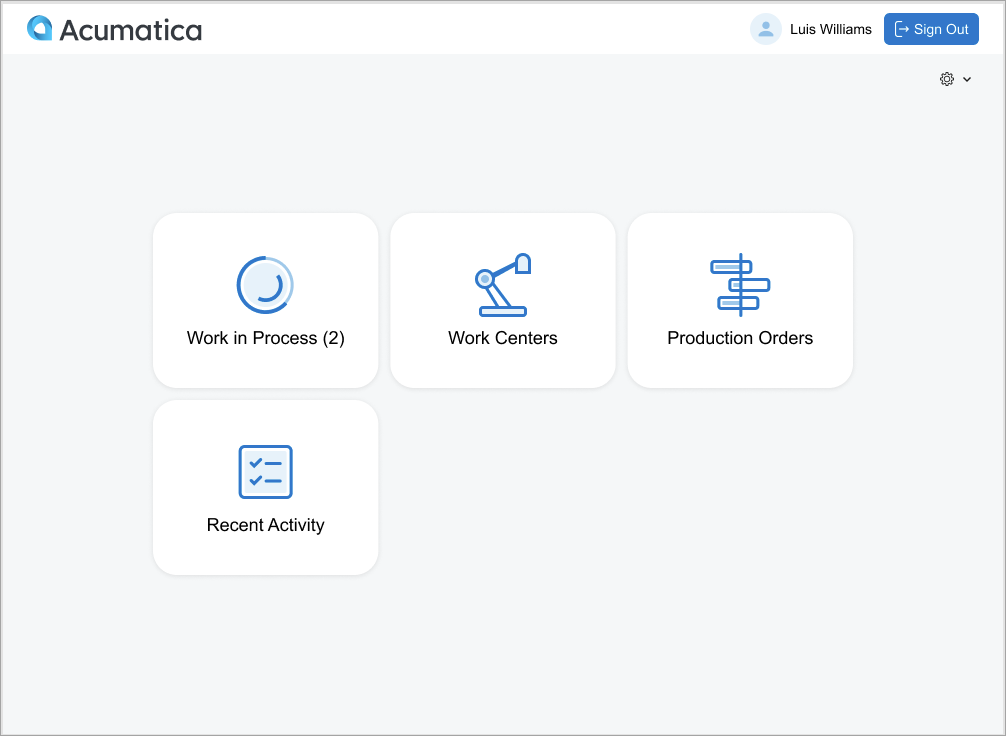
The home screen can provide access to work in process, work centres, production orders and recent activity. Operators can select work from a work centre dispatch list or choose a production order directly, supporting both paper-based and paperless workflows.
Capture Labour, Completed Quantities and Scrap
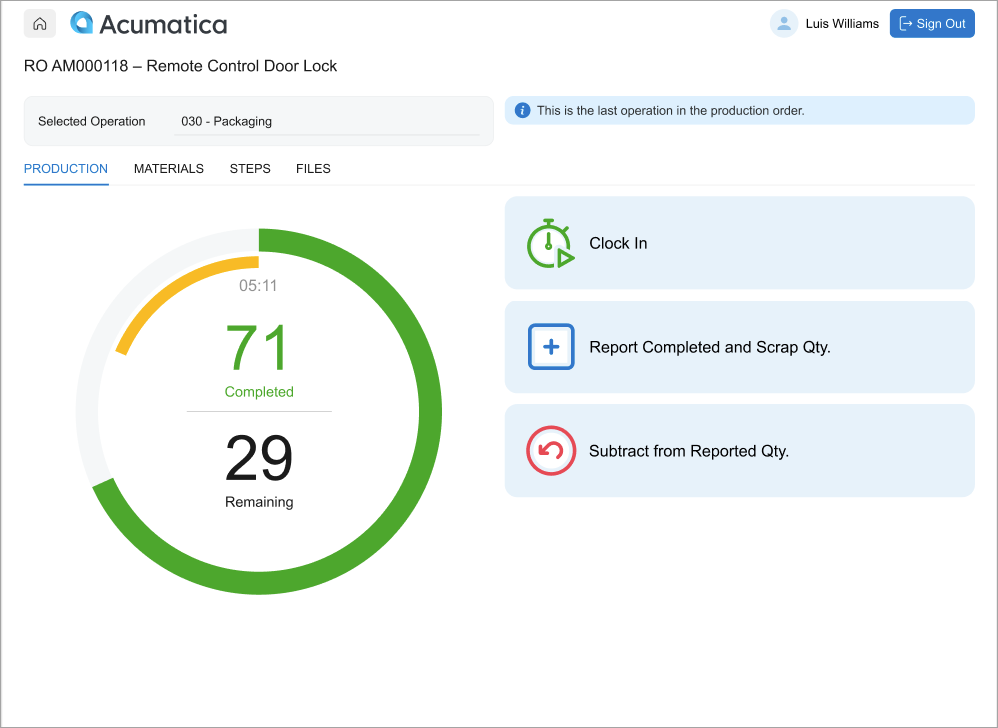
Production reporting is at the heart of the new kiosk. Depending on how the operation is configured, employees can clock in and out to capture direct labour time, report completed quantities and record scrap.
Operators can also:
- See completed and remaining quantities alongside a visual indication of labour time against plan.
- Report partial production quantities as work progresses.
- Record scrap and, where required, select a scrap reason.
- Capture production attributes such as measurements or inspection results where configured.
- Work with lot- and serial-tracked items where applicable.
- Issue materials through configured backflushing processes.
The production operation screen brings key reporting actions and progress information together, helping operators understand what has been completed and what remains.
Improve Quantity Reporting and Traceability
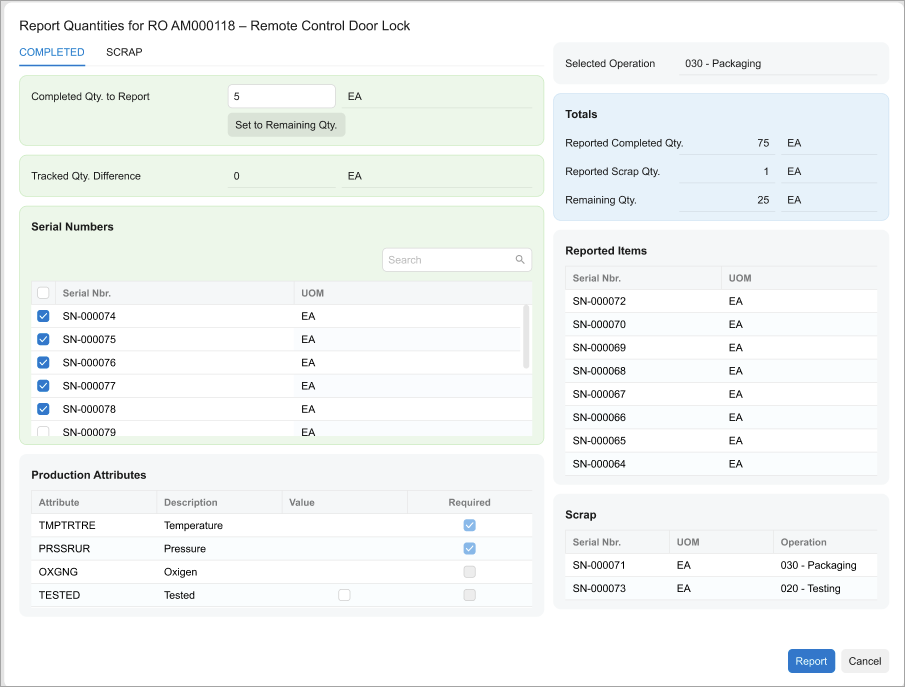
The kiosk's quantity reporting screen brings completed quantities, scrap, remaining quantities and relevant lot or serial numbers into one workflow. Where required by the production setup, employees can also enter production attributes.
For manufacturers handling traceable products or requiring production measurements, this helps bring important reporting information closer to the operation itself.
Give Operators the Information They Need
The kiosk is more than a transaction-entry screen. Operators can review required materials, planned and actual material quantities, work instructions, operation steps, images and supporting files directly from the operation details.
This is especially useful where different jobs require different components, production sequences or specifications. Making relevant information available at the point of work can help employees follow the intended process and reduce avoidable rework.
Better Information for Production Management
When production reporting happens closer to real time, supervisors and managers have a stronger basis for understanding work in progress, labour usage, completed output and production losses.
That information matters beyond the shop floor. Production activity contributes to material tracking, planning, inventory accuracy and manufacturing cost analysis across the wider MYOB Acumatica environment.
The value isn't simply replacing paper with a screen. It is making it easier to capture reliable production information as work happens, then use that information across the business.
What Manufacturers Should Know Before Getting Started
The Shop Floor Kiosk is introduced in MYOB Acumatica 2026.1.3 and is not automatically ready to use in every existing manufacturing environment. It must be enabled and deployed as a separate portal instance, with appropriate configuration and user access.
MYOB identifies two relevant licence types: a Manufacturing Service Account licence for the kiosk's service session and a paid Manufacturing Floor User licence for each operator requiring kiosk access. Operators do not need to sign in to the full ERP interface to use the kiosk, but they do require correctly configured MYOB Acumatica user accounts and linked production employee records.
MYOB also notes that the kiosk will evolve in future releases and currently advises against customising it. The present release does not support multiple production clock entries through the kiosk; manufacturers should review existing clock-entry procedures as part of implementation planning.
For the detailed product requirements, see the official MYOB Acumatica Shop Floor Kiosk release notes.
Part of a More Connected Manufacturing Process
The Shop Floor Kiosk is one part of a wider manufacturing process that connects product definition, material planning, production, inventory, warehouse management and finance.
For a broader look at how those functions work together, read our article Smarter Manufacturing with MYOB Acumatica: From Planning to Production.
And for manufacturers wanting to connect production output with stock movements, order processing and fulfilment, our companion article From Order to Fulfilment: How MYOB Acumatica Connects Sales, Inventory and Warehouse Operations explores the wider operational workflow.
How Cloud Factory Can Help
Cloud Factory helps Australian manufacturers evaluate, implement and optimise MYOB Acumatica across production, inventory, warehouse management and finance.
If you're considering the new Shop Floor Kiosk, we can help you assess its suitability for your production processes, understand the deployment and licensing requirements and consider how it fits into your wider manufacturing environment.